
Privilege escalation on Windows through a card printer software
Back in May, I was playing around with a card printer software I had previously installed on my laptop for a security workshop my company had organized to demonstrate how easy it is to clone another company’s employee badge.
On Windows, it is possible to download a tool called ProcMon. It is a real-time monitoring tool for Windows that captures and displays system activity. So, if you open ProcMon (Process Monitor) and configure the proper filters to isolate your application, you will be able to see all of the interactions the application does with your laptop, including file system, registry, and process/thread operations.
By analyzing the behaviour of the card printer software, I noticed that the software was attempting to load DLLs (dynamic-link library is a shared library in the Microsoft Windows operating system) that did not exist. The software, which runs under SYSTEM context (high privileges), will invoke the DEVOBJ.dll or CFGMGR32.dll in the folder “C:\ProgramData\Datacard\<CardPrinterSoftware>\Service” and respond with a NOT FOUND by the application installer.
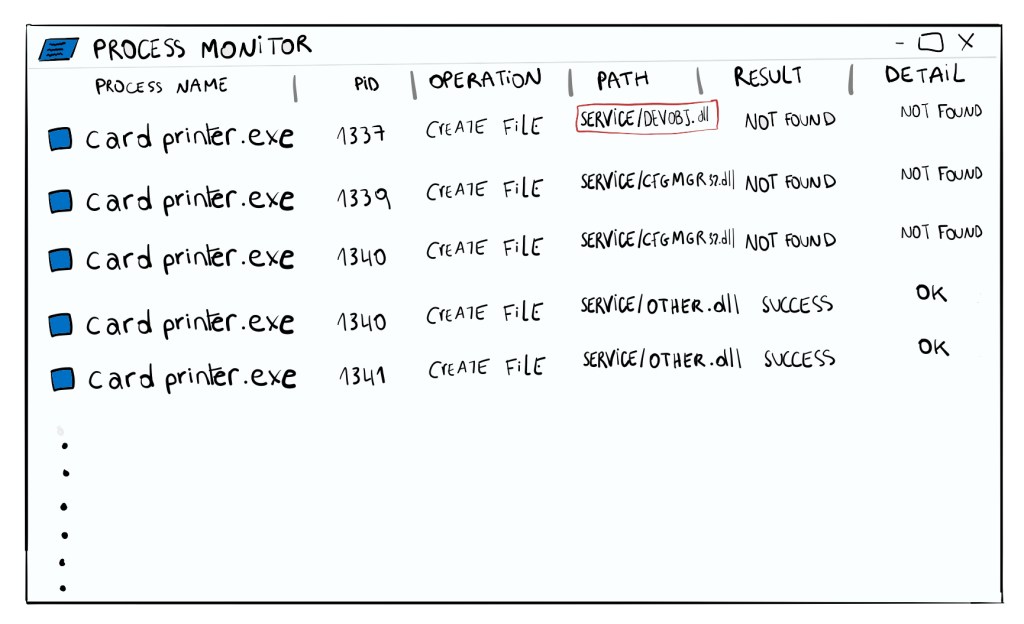
By running icalcs on the folder, I noticed that my regular user can write to it.
icacls "C:\ProgramData\Datacard\<CardPrinterSoftware>\Service"
C:\ProgramData\Datacard\<CardPrinterSoftware>\Service NT    AUTHORITY\SYSTEM:(I)(OI)(CI)(F)
BUILTIN\Administrators:(I)(OI)(CI)(F)
CREATOR OWNER:(I)(OI)(CI)(IO)(F)
BUILTIN\Users:(I)(OI)(CI)(RX)
BUILTIN\Users:(I)(CI)(WD,AD,WEA,WA)
Hold on! What does this all mean, you ask?
The Users group has the following permissions:
- Inherited Read & Execute permissions, meaning they can read and execute files within the directory and subdirectories.
- Inherited permissions to Write Data, Add Subdirectories, Write Extended Attributes, and Write Attributes, meaning they can modify the directory contents.
OK, so – Recap
A software which runs under SYSTEM privileges (highest privileges), loads libraries that do not exist from a folder we have write access to.
My hacker mind: what if I create a DLL that has the same name as the one the software is trying to load?… would that mean that SYSTEM would execute my crafted DLL? Well, yes.

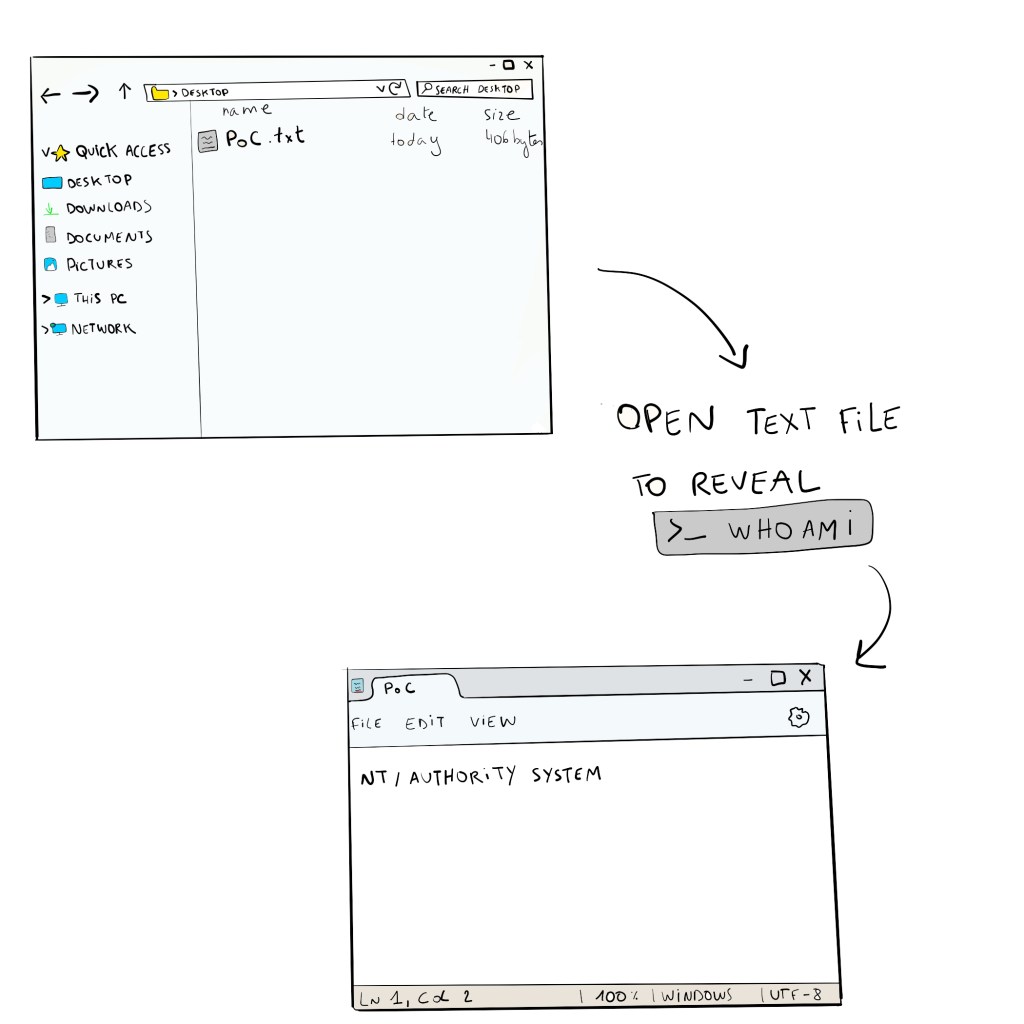
Okay, so I prepared a malicious DLL called DEVOBJ.dll, and as a Proof-of-Concept (PoC) it ran whoami and stored it in a file called PoC. I added the DLL in the folder where the software loads the missing DLLs, so in the Service folder.
Once the software begins its installation, it will search for my DLL and SYSTEM will execute the code contained in it. This means I could get privilege escalation since I can make SYSTEM execute any code I want.
After my malicious DLL is loaded, we can indeed find a PoC.txt file that was created in the desktop folder. Opening the file reveals that the whoami command was indeed executed by SYSTEM.
Conclusion
I have proven that I can escalate my privileges to the highest on the local computer by exploiting a missing DLL that is loaded by the card printer software in a folder in which a regular user has write access to.
The security bulletin for the privilege escalation vulnerability can be found here: https://www.entrust.com/sites/default/files/documentation/productsupport/entrust-security-bulletin-e24-004.pdf. Thank you to Entrust for their quick response and fix regarding this vulnerability.
More details can be found here: https://github.com/pamoutaf/CVE-2024-34329
Thanks a lot to Alaa Kachouh for his support on this project.
 pamoutaf
Leave a comment